Recently I encountered an issue with vSphere where I could not vMotion VM’s between hosts in the same cluster, even though they were the same generation CPU and EVC was enabled.
This was interesting to troubleshoot, so I thought I would post my learnings and solution for anyone else encountering this problem.
Firstly this is the error seen in vCenter Tasks when vMotion fails to migrate a VM encountering this problem.
The target host does not support the virtual machine's current hardware requirements.Use a cluster with Enhanced vMotion Compatibility (EVC) enabled to create a uniform set of CPU features across the cluster, or use per-VM EVC for a consistent set of CPU features for a virtual machine and allow the virtual machine to be moved to a host capable of supporting that set of CPU features. See KB article 1003212 for cluster EVC information. com.vmware.vim.vmfeature.cpuid.mdclearIn summary what has happened here is related to mitigation of recent Intel CPU vulnerabilities. Mitigation’s are implemented using new CPU features, which are exposed to VM’s via the hypervisor. If all the hosts don’t have the correct ESXi patches or CPU microcode updates, or they haven’t been applied correctly these types of errors can be encountered when migrating VM’s.
VMware have tried to maintain vMotion compatibility within clusters by having EVC hide these CPU features from VM’s until all hosts in the cluster have the mitigation applied. But in some situations this does not seem to be working correctly, resulting in VM’s powering on with the CPU features not all hosts in the cluster are compatible with which breaks vMotion compatibility.
Troubleshooting
In my case the feature in the error is “cpuid.mdclear”, which enables hypervisor-assisted mitigation for Microarchitectural Data Sampling (MDS) Vulnerabilities.
https://www.vmware.com/security/advisories/VMSA-2019-0008.html
https://kb.vmware.com/s/article/68024.
All hosts in the cluster were Sandybridge generation CPU’s, running ESXi 6.5 EP 17 (Build 14990892) and had hyperthreadingMitigation enabled. Though I have seen this problem with ESXi 6.7 P01 (Build 15160138) so the version is not relevant, except that these builds include the mitigation for the Microarchitectural Data Sampling vulnerability.
To troubleshoot the first step was to find which hosts were able to provide the MDCLEAR CPU feature to VM’s.
To determine this run the following from the ESXi shell on each host.
vim-cmd hostsvc/hostconfig|grep -A 2 MDCLEAR
On hosts which can provide the feature, this is the output.
key = "cpuid.MDCLEAR",
featureName = "cpuid.MDCLEAR",
value = "1"
},
--
key = "cpuid.MDCLEAR",
featureName = "cpuid.MDCLEAR",
value = "1"
},
On hosts which cannot provide the feature, this is the output. Note the 0 in the second set of output.
key = "cpuid.MDCLEAR",
featureName = "cpuid.MDCLEAR",
value = "1"
},
--
key = "cpuid.MDCLEAR",
featureName = "cpuid.MDCLEAR",
value = "0"
},
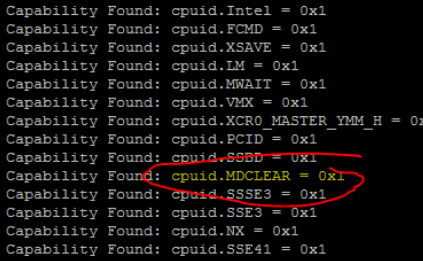
Another step which can be done to determine which VM’s are already running using the cpuid.MDCLEAR CPU feature, is to check the VM’s vmware.log stored in the folder with the VM’s VMX file. VM’s with this entry in the log won’t be able to vMotion to Hosts which are lacking this feature.
On VM’s which are using the cpuid.MDCLEAR feature, a log entry of “Capability Found: cpuid.MDCLEAR” will be seen.
Use this command to check a VM’s vmware.log.
cat vmware.log | grep -a MDCLEAR
or
cat vmware.log | grep -a Capability
So now we have found which VM’s and Hosts are affected.
Solution
In my case the solution was very simple, we knew that for some reason one host was not capable of using the MDCLEAR CPU feature. Even though it was running the correct ESXi build and so should have the correct microcode (via the ESXi CPU microcode loading feature) and ESXi support for it.
I found a post suggesting that a cold start of the host maybe needed. So after completely powering down the host and powering it on again, the host worked correctly and the MDCLEAR CPU feature was available. vMotion to the host started working.
I’m not really sure why this worked but suspect for some reason, ESXi was not able to load the microcode on that host when it was last booted.
Another solution may have been to upgrade the BIOS to the latest release from the vendor, if available which includes the MDSCLEAR CPU feature.
Be aware these types of problems have been encountered with mitigation for prior Intel CPU vulnerabilities, so these troubleshooting steps could be relevant to those.
For example.
cpuid.stibp
cpuid.ibrs
cpuid.ibpb
Credits
Here are some of the useful community information which helped with my troubleshooting.
https://communities.vmware.com/thread/611992
https://www.reddit.com/r/vmware/comments/cn7kvw/cross_cluster_vmotion_evc_issue/
https://kb.vmware.com/s/article/68024
https://blogs.vmware.com/vsphere/2015/05/using-esxi-6-0-cpu-microcode-loading-feature.html
https://www.vmware.com/security/advisories/VMSA-2019-0008.html
https://blog.definebroken.com/2018/01/25/drs-vmotion-failure-due-to-evc-incompatibilities-from-spectre-meltdown-patching/
If you encounter this problem, or found this post useful please comment below.
 Peter C's Tech.